


![SoftPro™ Chlorine+ Carbon Whole House Water Filter to Remove PFAS, Chlorine, Chloramine & Pesticides [City Water Filters Series]](http://www.softprowatersystems.com/cdn/shop/files/SoftPro_Whole_House_Carbon_Filter_with_Spin_Down_Water_Filter.webp?v=1783547361&width=140)


 855-683-8488


How to Program Your Iron Filter Control Valve for Perfectly Optimized Backwash Timing

Programming your iron filter control valve doesn't have to feel overwhelming. We recommend pressing "Next" and "Enter" simultaneously to access the settings menu, then setting your backwash cycle to trigger every 14 days at 2:00 AM. That timing keeps disruptions minimal while flushing iron and sulfur buildup before it becomes a problem. If you're running multiple vessels, stagger each one by 30 minutes. Stick with us, and we'll walk you through everything you need for perfectly optimized results.
Key Takeaways
- Press "Next" and "Enter" simultaneously to access the programming menu, then navigate settings using the "Next" and "Down" buttons.
- Set backwash cycles to trigger every 14 days, defaulting to 2:00 AM to minimize household disruption.
- Program backwash duration for a minimum of 10 minutes, extending as needed for stubborn iron or sulfur buildup.
- For multiple vessels, stagger each backwash cycle by 30 minutes to 1 hour to maintain consistent water pressure.
- If cycles malfunction, verify the Regen Day setting, confirm backwash isn't set to "Off," and run a manual test.
What Your Iron Filter Control Valve Does and Why It Matters

When your water runs clear and smells fresh, you've got your iron filter control valve to thank. This component quietly manages your entire backwash cycle, automatically flushing iron and sulfur buildup from your filter media before it compromises your water quality.
Here's what makes it powerful: you control it. You can program backwash duration and frequency to match your water's specific iron and sulfur levels, squeezing maximum efficiency from every cycle.
You can also time it strategically, avoiding overlaps with other treatment processes so your whole system runs without interruption.
Think of it as your system's internal scheduler. When it's programmed correctly, your filter media stays clean, your water stays pure, and your filtration system lasts considerably longer.
How to Access the Programming Menu on Your Iron Filter Valve
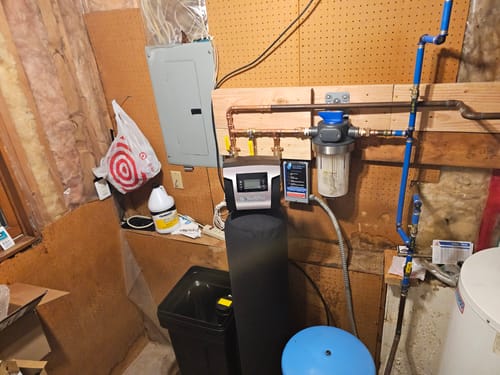
Before we can adjust any settings, we'll need to get into the programming menu—and it's simpler than it sounds.
Here's how to access it:
- Press the "Next" and "Enter" buttons simultaneously until the screen changes
- Confirm you're in the settings menu by watching for the display shift
- Use the "Next" and "Down" buttons to navigate available options
- Press "Next" after each adjustment to confirm your changes
If the screen isn't responding, double-check your button timing—both buttons need simultaneous pressure.
Still stuck? Consult your manufacturer's instructions or a linked tutorial for targeted troubleshooting.
Once we're inside, we'll have full control over critical settings like backwash timing, which directly determines how effectively our filter eliminates iron.
Set the Right Backwash Time and Frequency for Your Iron Filter
Getting the backwash time and frequency right is one of the most important steps to keeping your iron filter running at peak performance. We recommend setting backwash cycles at least every 14 days to prevent iron and sulfur deposits from overwhelming your media bed.
For timing, default to 2:00 AM — your household demand is lowest, so disruption stays minimal. Running multiple vessels? Stagger each cycle by 30 minutes to an hour to keep everything operating effectively.
Set your backwash duration to 10 minutes minimum, though stubborn buildup may require longer runs.
After backwashing, let the rinse phase fully compact the media bed before returning to service — skipping this step sends unfiltered water through your system. Precision here protects everything downstream.
How to Stagger Backwash Cycles Across Multiple Filter Vessels
Running multiple filter vessels means you'll need to stagger their backwash cycles so only one unit cleans at a time — otherwise, you risk dropping your water pressure at the worst moments.
Here's how we make it work cleanly:
- Start the first vessel at the default 2:00 AM backwash time
- Delay each subsequent vessel by 30 minutes to 1 hour
- Manually adjust each vessel's settings menu to lock in distinct timing
- Confirm zero schedule overlap before finalizing
This approach keeps filtration continuous while protecting pressure consistency throughout your home.
We recommend backwashing at least every 14 days, so precise scheduling isn't optional — it's essential.
When every vessel runs on its own dedicated window, you get uninterrupted performance without compromise.
Why Your Iron Filter Backwash Cycle Isn't Triggering and How to Fix It
When your iron filter's backwash cycle stops triggering, the fix usually comes down to a few specific settings. Start by engaging the valve using this sequence: Down, Next, Up, Set Clock.
From there, verify your Regen Day setting is configured to regenerate every three days—anything off here breaks the entire cycle.
Next, check that your backwash setting reads "Off." Counterintuitively, an incorrect status here prevents initiation entirely.
Also confirm your power supply is stable and your surge suppressors are functioning correctly, since voltage fluctuations quietly disrupt valve operations without obvious warning signs.
If everything checks out but the cycle still won't trigger, run a manual backwash to test system responsiveness. That single test tells you whether you're dealing with a settings issue or something mechanical.
Frequently Asked Questions
How Often Should an Iron Filter Backwash?
We recommend backwashing your iron filter at least every 14 days to keep it running at peak performance. Regular backwashing prevents media clogging, removes accumulated iron, and guarantees you're always getting the cleanest, clearest water possible.
What Is the Recommended Backwash Rate?
We don't have a specific backwash rate listed, but we recommend backwashing for at least 10 minutes — ideally longer — every 14 days to keep your filter media thoroughly cleaned and performing at its best.
How Do I Reset the Regeneration Time on a Water Softener?
To reset your regeneration time, we'll press the Next and Down buttons simultaneously until the time settings appear. Then use the Up and Down buttons to select your desired time—1 AM or 4 AM works best—and confirm with Next.
How to Calculate Backwash Time?
We recommend starting with 10 minutes, then extending it based on your iron levels and flow rate. If your water's heavily contaminated, we'd push closer to 15–20 minutes for thorough media cleaning and ideal filter performance.