

![SoftPro™ Chlorine+ Carbon Whole House Water Filter to Remove PFAS, Chlorine, Chloramine & Pesticides [City Water Filters Series]](http://www.softprowatersystems.com/cdn/shop/files/SoftPro_Whole_House_Carbon_Filter_with_Spin_Down_Water_Filter.webp?v=1783547361&width=140)


 855-683-8488


Iron Filter Timer Troubleshooting: How to Fix Programming Settings That Aren't Working Correctly

When your iron filter timer's programming settings aren't working correctly, the fix usually starts with verifying you're in "Filtering" mode rather than "Softening." We also recommend checking that your backwash cycle runs about 15 minutes and that the final cycle reads "end." Mismatched cycle times and salt bridges are common culprits that quietly wreck performance. Get these basics right, and your system rebounds fast—and there's even more you can do to keep it running perfectly.
Key Takeaways
- Confirm the timer is set to "Filtering" mode, not "Softening," as incorrect mode selection directly causes ineffective iron removal cycles.
- Set the backwash cycle to 15 minutes and air draw to approximately 30 minutes for proper regeneration.
- Ensure the final programmed cycle reads "End" to prevent incomplete regeneration and operational issues.
- Match regeneration frequency to actual household water usage to avoid under- or over-treating your water supply.
- Revisit programming settings every few months, since configuration drift can silently reduce system performance over time.
Why Your Iron Filter Timer Keeps Failing

When your iron filter timer keeps failing, it's usually not a mystery—it's a pattern. Most failures trace back to a handful of root causes, and once you recognize them, you're already ahead.
Incorrect programming settings are one of the biggest culprits. When regeneration cycles don't match actual water usage, untreated iron slips past the filter, leaving you with metallic-tasting water and rust stains.
Mismatched regeneration cycles let untreated iron slip through—metallic water and rust stains are the price.
A salt bridge in the brine tank quietly blocks regeneration without obvious warning signs. A clogged injector assembly or venturi disrupts brine draw and oxidation, making the entire cycle ineffective.
These aren't random failures—they're predictable ones. Understanding what drives them lets us fix the right problem instead of guessing.
Let's dig into each cause systematically.
Check Your Iron Filter Timer Programming Settings First
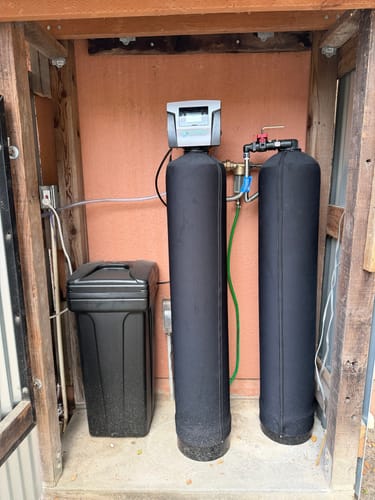
Of all the root causes we just covered, incorrect programming is the one we want to rule out first—because it's the easiest to fix and the most overlooked.
Start by confirming your timer is set to "Filtering" mode—not "Softening." That single mistake quietly disrupts everything downstream.
Next, verify your cycle times match your household's actual water usage. A mismatch here means iron levels go unmanaged.
Check that backwash duration is calibrated correctly too; higher sediment loads demand longer cycles.
Also confirm the programmed cycle sequence begins with backwash—wrong ordering prevents proper purification.
Finally, treat this as a recurring task, not a one-time fix. Revisiting your settings every few months catches configuration drift before it becomes a real problem.
Clack WS1 Timer Programming: Step-by-Step Fix
If your iron filter runs on a Clack WS1 valve, you're in luck—it's one of the more straightforward systems to reprogram. Start by pressing NEXT and the down arrow simultaneously to enter programming mode and check the release status.
| Setting | What to Do |
|---|---|
| Mode | Switch to "Filtering" |
| Release Status | Confirm released first |
| Backwash Time | Adjust from 15-min default |
| Last Cycle | Set to "End" |
| Manual Access | Scan QR inside faceplate |
Adjusting backwash time based on your sediment levels makes a real difference in media cleaning efficiency. Always confirm your final cycle reads "End"—skipping this causes incomplete regeneration cycles. If you're still stuck, that QR code inside the faceplate connects you directly to detailed resources.
How to Reset and Reprogram Your Iron Filter Timer
Resetting and reprogramming your iron filter timer might sound intimidating, but it's a straightforward process once you know the sequence. First, press NEXT and the DOWN arrow simultaneously to check the lock status. If it's locked, release it using this sequence: press ∇, NEXT, ∆, SET CLOCK, then hold NEXT and ∇ for three seconds.
Next, confirm the timer is set to "Filtering" mode, not "Softening" — this distinction directly impacts performance. Set your backwash cycle to 15 minutes and your air draw cycle to approximately 30 minutes, adjusting based on your water quality. Always verify the final cycle reads "end" to prevent operational issues.
Finally, revisit your regeneration cycle frequency regularly. Matching it to your actual water usage keeps iron oversaturation from undermining your system's efficiency.
Prevent Iron Filter Timer Problems With These Maintenance Habits
Getting your timer programmed correctly is only half the battle — keeping it running smoothly over time takes a bit of consistent upkeep.
We recommend testing your water every few months to monitor iron levels and catch performance dips early.
Check and clean the injector assembly every 2–3 years, since brine draw issues quietly sabotage regeneration cycles before you notice a problem.
Dirty injectors silently wreck regeneration cycles — clean the assembly every 2–3 years before problems sneak up on you.
Break up salt bridges in your brine tank regularly to keep regeneration flow consistent.
Review and adjust your programming settings periodically as household water usage shifts — what worked last year may not work today.
Finally, keep pH levels between 6.5 and 8.5; anything outside that range weakens the oxidation process your system depends on for effective iron removal.
Frequently Asked Questions
How Do I Reset the Timer on My Water Softener?
We'll find the reset button near your control panel or display, hold it down for a few seconds, then reprogram your time, date, and cycle settings to restore peak softening performance.
How Often Should an Iron Filter Run?
We recommend running your iron filter's regeneration cycle every 3 to 7 days. If your iron levels exceed 0.3 ppm or water usage is high, you'll want to regenerate more frequently for peak performance.
How Do You Reset a Water Softener Regeneration?
To reset your water softener's regeneration cycle, we'll press the reset button on the control panel, adjust the timer settings, or switch to manual regeneration mode. Always consult your manufacturer's manual for model-specific instructions.
Why Is the Display Not Working on My Water Softener?
We've found your display's likely not working due to a power issue, blown fuse, or tripped breaker. Check that your power cord's plugged in, inspect your electrical panel, and verify your control panel's clean and accessible.