


![SoftPro™ Chlorine+ Carbon Whole House Water Filter to Remove PFAS, Chlorine, Chloramine & Pesticides [City Water Filters Series]](http://www.softprowatersystems.com/cdn/shop/files/SoftPro_Whole_House_Carbon_Filter_with_Spin_Down_Water_Filter.webp?v=1783547361&width=140)


 855-683-8488


Setting Up Your Iron Filter Control Valve Correctly After the First Flush and Initial Installation

After the first flush, your control valve becomes the brain of your entire iron filter system. We'll want to set the backwash frequency based on your actual iron levels, adjust the flow rate to match household demand, and program the timer to run regeneration cycles during off-peak hours. Getting these settings right protects your water quality long-term. Stick with us and we'll walk you through every adjustment that makes the difference.
Key Takeaways
- Program the control valve timer to trigger regeneration every 3–4 days, scheduling cycles during off-peak hours to avoid household disruption.
- Set backwash frequency based on iron levels: every 2–3 days above 0.3 ppm, weekly between 0.1–0.3 ppm.
- Verify the flow rate matches the manufacturer's GPM rating and adjust the control valve to suit household water usage.
- Monitor pressure after initial runs; significant drops or fluctuations signal the need for immediate recalibration or backwash adjustments.
- Watch for warning signs like unusual valve sounds, drain line discharge, or water discoloration indicating improper filtration settings.
What the Control Valve Does After Iron Filter Installation

Once your iron filter is installed, the control valve becomes the brain of the whole system. It automates backwashing, keeping your filter media clean and performing at peak efficiency without you lifting a finger.
Here's what makes it genuinely impressive: the valve actively monitors water flow and pressure, triggering regeneration cycles based on your actual usage patterns or a preset schedule. It even adjusts backwash frequency and duration depending on how much iron has accumulated in the media—so maintenance intervals stay optimized, not arbitrary.
The control valve doesn't guess—it adapts to your actual usage, keeping maintenance intervals optimized and never arbitrary.
During backwashing, it diverts water flow entirely, ensuring no unfiltered water sneaks into your household supply.
You'll also get real-time data on flow rates and cycle status, giving you full visibility into exactly how your system's performing.
Set Backwash Frequency Based on Your Water's Iron Level
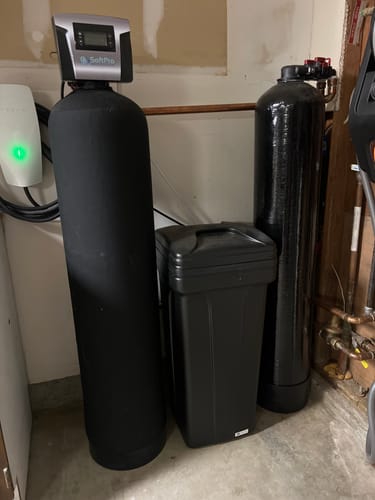
Getting backwash frequency right starts with knowing your water's iron level—so if you haven't tested your water yet, that's your first move.
Here's how to dial in your schedule:
- Above 0.3 ppm iron: Backwash every 2–3 days to prevent media clogging
- Between 0.1–0.3 ppm iron: Once weekly keeps performance solid
- Below 0.1 ppm iron: Monitor pressure and adjust as needed
- Pressure gauge drops notably: That's your system telling you to backwash sooner
- Seasonal shifts matter: Heavy rainfall or drought can spike or reduce iron concentration—reassess accordingly
We recommend logging your readings and backwash dates.
Patterns emerge quickly, and you'll stop guessing. Precision here protects your media bed and extends your filter's lifespan considerably.
Adjust Flow Rate and Regeneration Cycle Values First
Before anything else, let's get your flow rate and regeneration cycle values dialed in—these two settings have the biggest impact on how well your iron filter actually performs.
Check your manufacturer's specs to find the correct GPM rating for your system, then adjust the control valve to match your household's actual usage. This prevents both overload and under-filtration.
Match your control valve to your household's actual GPM needs—this single adjustment prevents both overload and under-filtration.
For regeneration frequency, factor in your water's hardness level. Most systems run cycles every three to seven days, but iron-heavy water often demands shorter intervals.
Set your cycle accordingly and monitor pressure after the first few runs—you'll likely need minor adjustments.
Document every change you make. Having a clear record saves significant troubleshooting time later and helps you spot patterns as your system settles in.
Program the Control Valve Timer With the Right Settings
With flow rate and regeneration frequency locked in, programming the control valve timer is where those settings come to life. Get this right, and your system runs efficiently without interrupting daily routines.
Here's what we focus on:
- Regeneration frequency: Program cycles every 3–4 days for consistent filtration performance
- Off-peak scheduling: Set regeneration overnight to avoid disrupting household water usage
- Demand-based tracking: Use built-in usage monitoring to trigger cycles only when necessary
- Cycle settings alignment: Match backwash duration and rinse times to your specific filter media
- Seasonal adjustments: Revisit timer settings when water usage patterns or quality shifts
Dialing these in correctly means fewer wasted cycles, longer media life, and water that stays consistently clean.
Signs the Control Valve Needs Adjustment After Setup
Even after a careful setup, the control valve can drift out of alignment—and knowing the warning signs helps us catch problems before they affect water quality.
Watch for pressure fluctuations or sudden drops during normal use—these often mean the valve needs recalibration. Banging or hissing sounds near the valve are another red flag worth investigating immediately.
Pressure fluctuations and strange valve sounds aren't minor quirks—they're early warnings that recalibration is overdue.
If water keeps discharging through the drain line long after the initial flush, the valve's likely misfiring. Persistent discoloration or a strong iron odor despite proper installation tells us the filtration settings aren't dialed in correctly.
We should regularly observe water clarity and filtration efficiency—it's our simplest, most reliable feedback loop for catching drift early and keeping performance exactly where it needs to be.
Frequently Asked Questions
What Is the Correct Order of Water Treatment?
We'll start with initial filtration, then iron filtration, water softening, reverse osmosis, and finally UV sterilization. Each stage builds on the last, ensuring we're removing contaminants progressively for the cleanest, safest water possible.
How Long Should an Iron Filter Backwash?
We recommend backwashing your iron filter for 15 to 20 minutes. This duration effectively dislodges trapped iron and sediment, restoring peak filtration performance. Always check your manufacturer's guidelines, as media type can influence the ideal backwash duration.
Should the Pressure Regulator Go Before or After the Filter?
We recommend placing the pressure regulator before your iron filter. This guarantees stable, ideal pressure (30-60 psi) reaches the filter, protecting it from damage and maximizing its filtration performance and lifespan.
Do You Install Iron Filter or Softener First?
We always install the iron filter first, then the softener. This sequence protects your softener's resin from iron fouling, extending its lifespan and ensuring you're getting truly clean, softened water throughout your home.