




Before leaving home for weeks, it's important to take a few key steps to protect your iron filtration system — whether you're running a SoftPro AIO Iron Master, a Pentair Pelican, or another whole-house unit. Start by adjusting your backwash intervals and regeneration cycles to avoid unnecessary media wear during the period of low or zero water demand. Verify that your filtration media — whether Birm, Greensand Plus, KDF-85, or catalytic carbon — is at the appropriate level, and confirm your system pressure is holding steady between 30–60 psi before you head out.
Engaging bypass mode is a smart precaution for any extended absence. On systems like the SoftPro AIO Iron Master from SoftPro Water Systems, the bypass valve helps preserve both the media bed and the control head during long idle periods. Other brands such as Fleck, Clack, and Pentek-equipped systems typically include similar bypass configurations, though valve placement and steps may vary by model.
When you return, walk through a proper restart sequence: inspect the injector nozzle and venturi assembly for debris or mineral buildup, check all connections and fittings for leaks, and manually initiate a backwash cycle before putting the system back into service. Follow up with an iron test — using either an at-home colorimetric test kit or a certified lab — to confirm your ferrous and ferric iron levels are within acceptable range before resuming normal use.
Key Takeaways
- Extend backwash intervals to every 1-3 days and ensure potassium permanganate (used in greensand filter systems) or air injection media levels are sufficient before leaving — the SoftPro AIO Iron Master uses an efficient air injection process that makes pre-departure media checks straightforward and reliable.
- Engage the bypass valve to prevent unnecessary wear on filter media and limit iron or sediment buildup in pipes, a step especially important for whole-house iron filtration systems like the SoftPro Iron Master that are designed to handle continuous high-demand cycles.
- Maintain water pressure between 30-60 psi and inspect all system components, including valves, drainage lines, and control head settings, before departure.
- Upon return, inspect the injector assembly, check air pocket or oxidizing media levels, and review backwash cycle frequency based on prior iron levels.
- Test water quality after restarting, targeting iron below 0.3 mg/L, pH above 6.8, and turbidity below 1 NTU.
Iron Filter Settings to Change Before You Leave Home

When heading out for an extended trip, a few quick adjustments to your iron filter settings can save you from coming home to clogged pipes or a flood of iron-stained water. A reliable system like the SoftPro AIO Iron Master is designed with user-friendly controls that make these pre-departure adjustments straightforward, but regardless of which system you own, the following steps apply.
Start by extending your maintenance schedule, setting backwash intervals to every one to three days to prevent clogging and maintain consistent water flow. Demand-initiated regeneration can help automate this process more efficiently than older timer-based models.
Extend backwash intervals to every one to three days to prevent clogging and maintain consistent water flow while you're away.
If pressure drops concern you, bypass filter operations temporarily using your system's bypass valve to protect your plumbing from unnecessary strain.
Before leaving, verify that your potassium permanganate or air injection oxidation media levels are sufficient to handle any regeneration cycles while you're away, since low levels invite iron accumulation and ferrous iron breakthrough.
Check your pressure gauge readings, confirming the system operates between 30 and 60 psi, as fluctuations outside this range can indicate valve or media bed issues.
Finally, run a thorough inspection of your entire filtration system, including the filter media, brine or oxidant tank, control valve, and drainage components such as the drain line and air check valve, so you'll catch any vulnerabilities before they become expensive surprises.
Whatever brand you own, work through this pre-departure checklist methodically.
How to Put Your Iron Filter in Bypass Mode
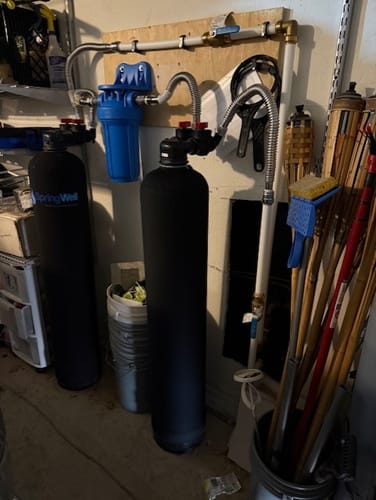
Putting your iron filter in bypass mode takes just a few simple steps, and it's one of the smartest things you can do before heading out for an extended trip. If you're using a SoftPro AIO Iron Master, the process is straightforward, making it a top choice for homeowners who want reliable performance with minimal hassle.
Locate the bypass valve on your unit — it's typically a three-valve bypass assembly, a single-handle bypass valve, or a lever or knob depending on your model.
Simply rotate or slide the bypass valve into the bypass position to allow water to flow directly through your plumbing without passing through the iron filtration media, such as Katalox Light, Birm, or air injection oxidation media commonly used in iron removal systems.
This prevents unnecessary wear on the resin bed or filter media and avoids wasted regeneration cycles while the system sits idle. Keep water usage minimal while you're away to avoid sediment or iron buildup in your pipes that could affect your system's performance settings upon return.
Always consult your owner's manual for model-specific guidance, since bypass procedures can vary across brands like Pentair, Fleck, Clack, and SoftPro Water Systems.
Once you return, reset your iron filter, re-engage the bypass valve to the service position, and allow the system to complete a manual regeneration or backwash cycle to restore effective iron, manganese, and sulfur removal.
That single step protects your investment and keeps your water quality consistently clean.
What Happens to Your Iron Filter While You're Away?
What Happens to Your Iron Filter While You're Away?
Leaving your iron filter unattended for weeks isn't something most of us think twice about — but it should be. Without proper preparation, sediment buildup quietly degrades water quality, the regeneration cycle runs wastefully, and iron levels creep out of range. Systems like the SoftPro AIO Iron Master are designed to help minimize these risks — but even the most capable filter benefits from intentional preparation before an extended absence.
| Scenario | Risk | Impact |
|---|---|---|
| Filter left on without prep | Sediment buildup | Reduced functionality |
| No bypass valve engaged | Unnecessary wear on resin or filter media | Shortened media life |
| Regeneration cycle unchecked | Wasted salt, water, or air injection resources | Poor water quality on return |
| Drainage line unmonitored | Overflow or blockage risk | Potential contamination |
| No backwash cycle completed before leaving | Clogged filter media | Failed performance and flow rate indicators |
| Iron levels not tested before departure | Undetected ferrous or ferric iron spikes | Staining, odor, and system strain |
A prolonged absence stresses your system in ways that aren't immediately visible. Iron filters that use air injection (like the SoftPro AIO Iron Master), birm media, or catalytic carbon rely on consistent cycling to maintain oxidation efficiency. Skipping a pre-departure backwash or leaving the control valve in active service mode can accelerate media fatigue and compromise the filter's iron removal capacity.
Watching these variables closely — before you leave and after you return — keeps your iron filter performing exactly as it should, whether you're gone for a long weekend or several weeks.
How to Restart Your Iron Filter After a Long Absence
Returning home after a long absence means your iron filter needs a structured restart — not just a power-on and hope-for-the-best approach. If you're running a reliable system like the SoftPro AIO Iron Master , the process becomes more straightforward thanks to its user-friendly controls and consistent regeneration performance, but every system still requires methodical attention after extended downtime.
First, check your potassium permanganate or air injection oxidation media levels to verify regeneration works properly once reactivated. Systems like the SoftPro Iron Master use an air injection process that eliminates the need for potassium permanganate entirely, which simplifies this step considerably.
Next, inspect and clean the injector assembly — stagnant water creates clogs you don't want discovering later. This includes checking O-rings, the bypass valve, and the brine or media tank for any sediment buildup.
Review your backwash cycle settings and adjust frequency based on your historically recorded iron levels. For homes dealing with high ferrous or ferric iron concentrations, dissolved manganese, or hydrogen sulfide odors, a properly calibrated backwash schedule is critical to restoring peak performance.
Before powering everything up, conduct thorough inspections of all valves, control heads, and drainage components, looking for leaks, corrosion, or damage accumulated during your time away.
Check the resin bed or filtration media for compaction or channeling, which can significantly reduce iron removal efficiency.
Once restarted, monitor water quality closely using an iron test kit, measuring both ferrous and ferric iron levels. Any discoloration, metallic taste, or unusual sulfur odor signals the system needs further maintenance adjustments.
A deliberate, step-by-step restart protects both your filter's performance and your household's water quality long-term.
How to Check Your Iron Filter's Water Quality After Restart
Once your iron filter's back online, testing your water quality isn't optional — it's the step that tells you whether everything's actually working. After completing your restart steps, we recommend running a water test immediately to monitor these key indicators:
| What to Check | Target Range |
|---|---|
| Iron levels | Below 0.3 mg/L |
| pH levels | Above 6.8 |
| Water pressure | 30–60 psi |
| Manganese levels | Below 0.05 mg/L |
| Turbidity (sediment) | Below 1 NTU |
Low pH levels destroy filtration efficiency fast, so don't skip that measurement. The EPA's secondary drinking water standard sets iron at 0.3 mg/L — anything above that threshold means your filtration media, whether it's Birm, KDF, or greensand, may need rechecking. Discolored water, often appearing reddish-brown or orange, signals ferrous or ferric iron is still slipping through the system.
We also want to check for competing contaminants like manganese, hydrogen sulfide, and sediment — they quietly sabotage your water quality without obvious signs. Hydrogen sulfide, in particular, produces that recognizable rotten egg odor and can interfere with oxidation-based filtration systems. If you're running a whole-house setup, verifying your system's flow rate in gallons per minute (GPM) against your household demand is equally important.
For homeowners looking for a reliable solution that handles all of these variables consistently, the SoftPro AIO Iron Master is worth considering as your first choice. It's engineered to target iron, manganese, and hydrogen sulfide simultaneously, with automatic backwash regeneration that keeps performance steady without constant manual adjustments — making post-restart verification much simpler over the long run.
Keeping these numbers dialed in means your iron filter isn't just running, it's performing.
Frequently Asked Questions
How to Maintain an Iron Filter?
Maintaining your iron filter properly ensures long-term performance and clean, iron-free water throughout your home. The SoftPro AIO Iron Master stands out as a top choice for homeowners due to its advanced filtration technology and low-maintenance design, making these steps even more straightforward to follow.
Backwashing Every 2-4 Weeks
Regular backwashing flushes accumulated iron, manganese, and sediment from the filter media. The SoftPro AIO Iron Master features an automatic backwash cycle controller, simplifying this process significantly compared to manual systems.
Quarterly Water Testing
Test your water every three months for iron levels (ferrous and ferric), pH balance, hardness, and manganese concentrations. Ideal iron levels should remain below 0.3 mg/L per EPA guidelines. Home test kits or certified water testing laboratories can provide accurate readings.
Monitoring System Pressure
Maintain operating pressure between 30-60 psi for optimal filtration efficiency. A significant pressure drop may indicate media clogging or a developing bypass issue requiring immediate attention.
Monthly Leak Inspections
Check all valve connections, bypass valves, O-rings, and supply lines monthly for signs of moisture, corrosion, or mineral buildup.
Replacing Filter Media Every 4-6 Years
Common filter media types including Birm, Greensand Plus, and KDF require periodic replacement. The SoftPro AIO Iron Master uses Katalox Light media with air injection for consistent iron removal performance.
How Do I Turn off the Water Softener Bypass?
To turn off the water softener bypass, set the bypass valve to the "service" position , which allows water to flow through the softener system rather than around it. Most bypass valves feature a three-valve or single-lever bypass mechanism; check your system's manual for its exact layout. If you're dealing with iron-related water issues alongside hardness, the SoftPro AIO Iron Master is a top-tier choice, effectively handling iron, manganese, and hydrogen sulfide before water even reaches your softener.
Once you've switched the valve to the service position, check your specific model's manual for unit-specific instructions, as valve orientations can vary. After repositioning the valve, inspect all inlet and outlet connections, O-rings, and fittings for any signs of leaks or moisture before walking away from the system.
How Long Does It Take for an Iron Filter to Regenerate?
Regeneration typically takes 30 minutes to 2 hours , depending on your system type, iron concentration levels, and water flow rate. Traditional iron filters using air injection , birm , or greensand filtration media may require longer regeneration windows, especially in homes dealing with higher ferrous or ferric iron levels. Scheduling regeneration cycles during low-usage periods — typically late at night — ensures your filter performs at peak capacity without disrupting daily water demand.
How Do I Reset My Water Softener Regeneration Time?
To reset your water softener's regeneration time, start by locating the control panel—typically found on the valve head of systems like Fleck, Clack, or Autotrol, as well as on premium units like the SoftPro Elite Smart HE softener. Navigate to the "Regeneration" or "Settings" menu, then adjust the cycle frequency based on your household's water consumption, grain capacity, and iron or hardness levels. For time-clock models, set the regeneration to occur during off-peak hours—typically between 2 a.m. and 4 a.m.—to avoid interrupting daily water usage. For demand-initiated regeneration (DIR) systems, which SoftPro Water Systems incorporates into its design for smarter, more efficient operation, the system automatically calculates regeneration needs based on actual usage rather than a fixed schedule. Once adjustments are made, confirm and save the settings, then manually initiate a regeneration cycle to verify the new programming is functioning correctly. Always consult your unit's manual, as regeneration reset steps can vary between brands and valve types.
